
Dynatrace vs Grafana - A Detailed Comparison for 2026
Dynatrace and Grafana are popular tools when it comes to monitoring and observability. In this post, I have compared Dynatrace and Grafana on important features like APM, log management, infrastructure monitoring, pricing, etc.
Table of Contents:
- Dynatrace vs Grafana: An Overview
- Real Pain Points to Watch Out For
- APM: Which Catches Problems Faster?
- Log Management: Speed vs. Flexibility
- Infrastructure Monitoring
- Visualization and Dashboards
- UI/UX - Grafana vs Dynatrace
- Pricing: What You’ll Actually Pay
- Dynatrace vs Grafana: Final Verdict
- Atatus - A better Alternative for Dynatrace and Grafana
Dynatrace vs Grafana: An Overview
Dynatrace is an enterprise-grade, AI-powered observability platform. It monitors everything like applications, infrastructure, logs, and security from a single agent. You install OneAgent, and it starts collecting data automatically. No stitching required.
Grafana is a visualization and dashboarding tool. Out of the box, it shows you nothing; it just connects to data sources. Pair it with Prometheus for metrics, Loki for logs, and Tempo for traces, and you have a powerful (but complex) open-source stack.
The core tension: Dynatrace is powerful but expensive. Grafana is flexible but requires significant engineering time to set up and maintain. Neither is obviously better. It depends on your team, your budget, and how much you want to manage.
Here’s a quick comparison of Dynatrace and Grafana based on key features and functionality:
| Feature | Dynatrace | Grafana | Atatus |
|---|---|---|---|
| Ease of Setup | Low (auto-discovery via OneAgent) | High (manual config of full stack) |
✓ Advantage Quick, agent-based & agentless deployment |
| Pricing Transparency | Opaque consumption-based pricing | Free OSS / usage-based Cloud |
✓ Advantage Transparent usage-based pricing |
| Full-Stack Observability | Unified APM, Infra, Logs & Security |
Partial Plugin assembly required |
✓ Unified APM, RUM, Infra, Logs & Tracing |
| Application Performance Monitoring | Auto-instrumented with Davis AI | Manual plugins + configuration | Full APM with tracing & error tracking |
| Real User Monitoring | Built-in | Not Built-in | Built-in RUM with Session Replay & Core Web Vitals |
| Infrastructure Monitoring | Unified host/container/cloud visibility | Manual integrations per source | Servers, Containers, Kubernetes & Cloud |
| Log Management | Grail (schema-less, high-volume) | Loki setup required | Centralized ingestion, search & alerting |
| Alerting | Davis AI anomaly detection | Manual alert rules | Anomaly detection + custom thresholds |
| Best For | Large enterprises needing AI automation | Teams wanting open-source flexibility | SaaS companies and mid-market teams seeking unified observability without Dynatrace complexity or Grafana's DIY setup |
Real Pain Points to Watch Out For
Dynatrace Pain Points
- Sticker shock at renewal. Dynatrace bills on host units, DDUs (Davis Data Units), and a dozen other consumption metrics. Bills often come in 3–5x higher than expected.
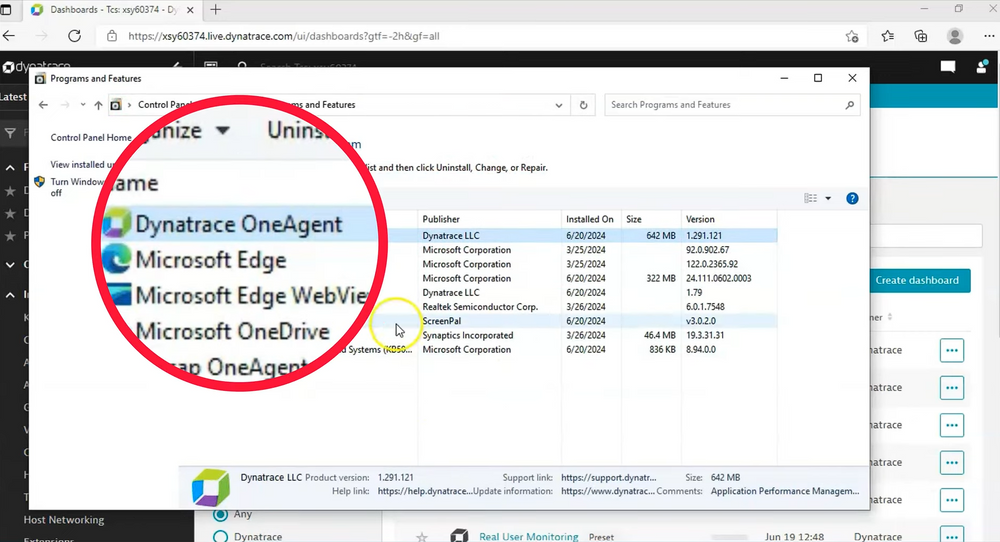
- Hard to navigate. The UI has improved, but finding APM settings still often requires reading docs. Steep learning curve for new engineers.
- Overkill for small teams. If you’re running a 10-person SaaS startup, you’re paying for enterprise capabilities you’ll never use.
Grafana Pain Points
- It’s not one tool, it’s a stack. Grafana alone doesn’t monitor anything. You’re assembling Prometheus + Loki + Tempo + alert manager + exporters. Each needs maintenance.
- Dashboard sprawl. Teams end up with 50+ dashboards, half of them outdated. Without discipline, it becomes impossible to know which one to trust during an incident.
- No AI-assisted root cause. When something breaks at 2am, you’re manually combing through metrics and logs. There’s no Davis AI to point you in the right direction.
- Hidden ops cost. Self-hosting Grafana + Prometheus at scale means managing storage, retention policies, and high-availability setups. It’s not free in engineering time.
APM: Which Catches Problems Faster?
To evaluate the APM feature in Grafana and Dynatrace, I sent data from a sample application to both platforms. While the APM setup was straightforward on both, Grafana required a few extra steps.
Grafana APM
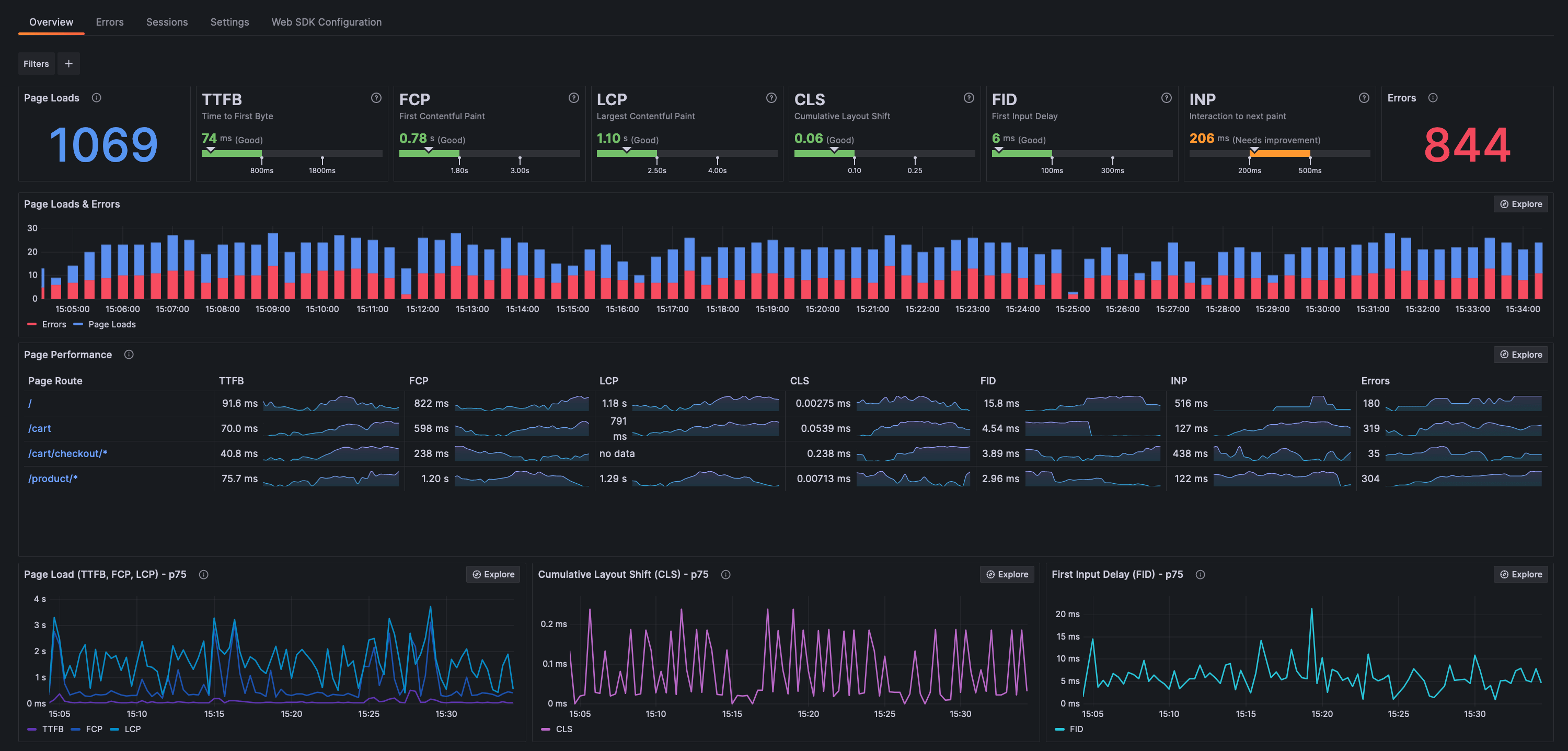
Grafana Cloud uses its Application Observability solution, integrating with Tempo (traces), Prometheus (metrics), and Loki (logs). It works well, but requires you to set it up, instrument your code, and configure your pipelines first.
For teams comfortable with OpenTelemetry, Grafana is a solid, flexible choice. For teams that want to plug something in and have it just work, it’s more of a project.
Dynatrace APM
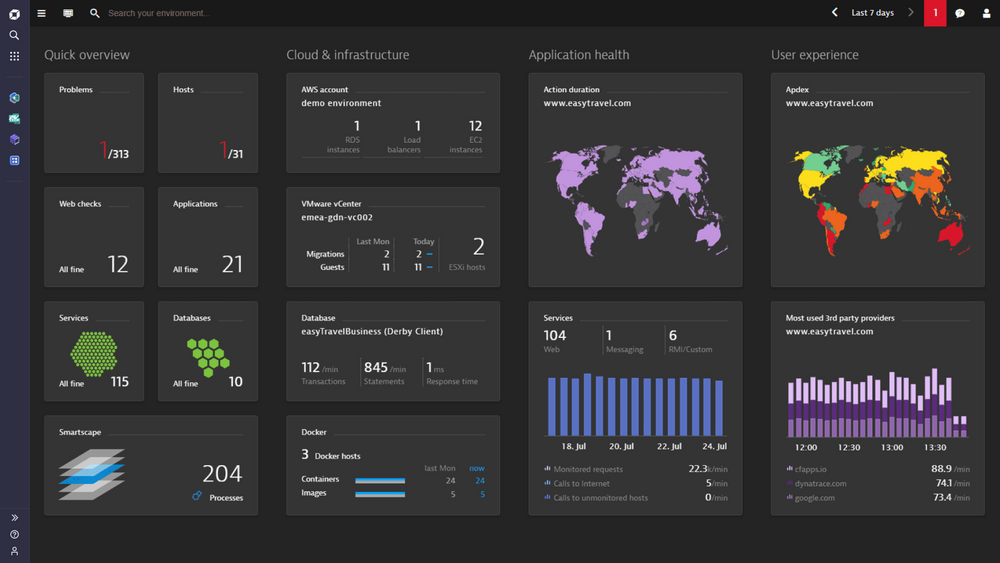
Install OneAgent, and Dynatrace starts monitoring your application automatically. It maps service dependencies, traces transactions end-to-end and this is the key differentiator, uses its Davis AI to tell you what broke and why, not just that something broke.
One caveat: finding APM in the Dynatrace UI isn’t obvious. New users often miss it entirely without checking the docs. That’s a real friction point.
Pros: Zero-code auto-instrumentation, AI detects and explains anomalies, full-stack context (code to infra), automatic dependency mapping.
Cons: Hard to find in the UI, OneAgent SDK needs code changes, expensive at scale.
If you want automated, AI-powered problem detection with minimal effort, Dynatrace wins. If you want flexibility and control and have the engineering bandwidth, Grafana is viable.
Log Management: Speed vs. Flexibility
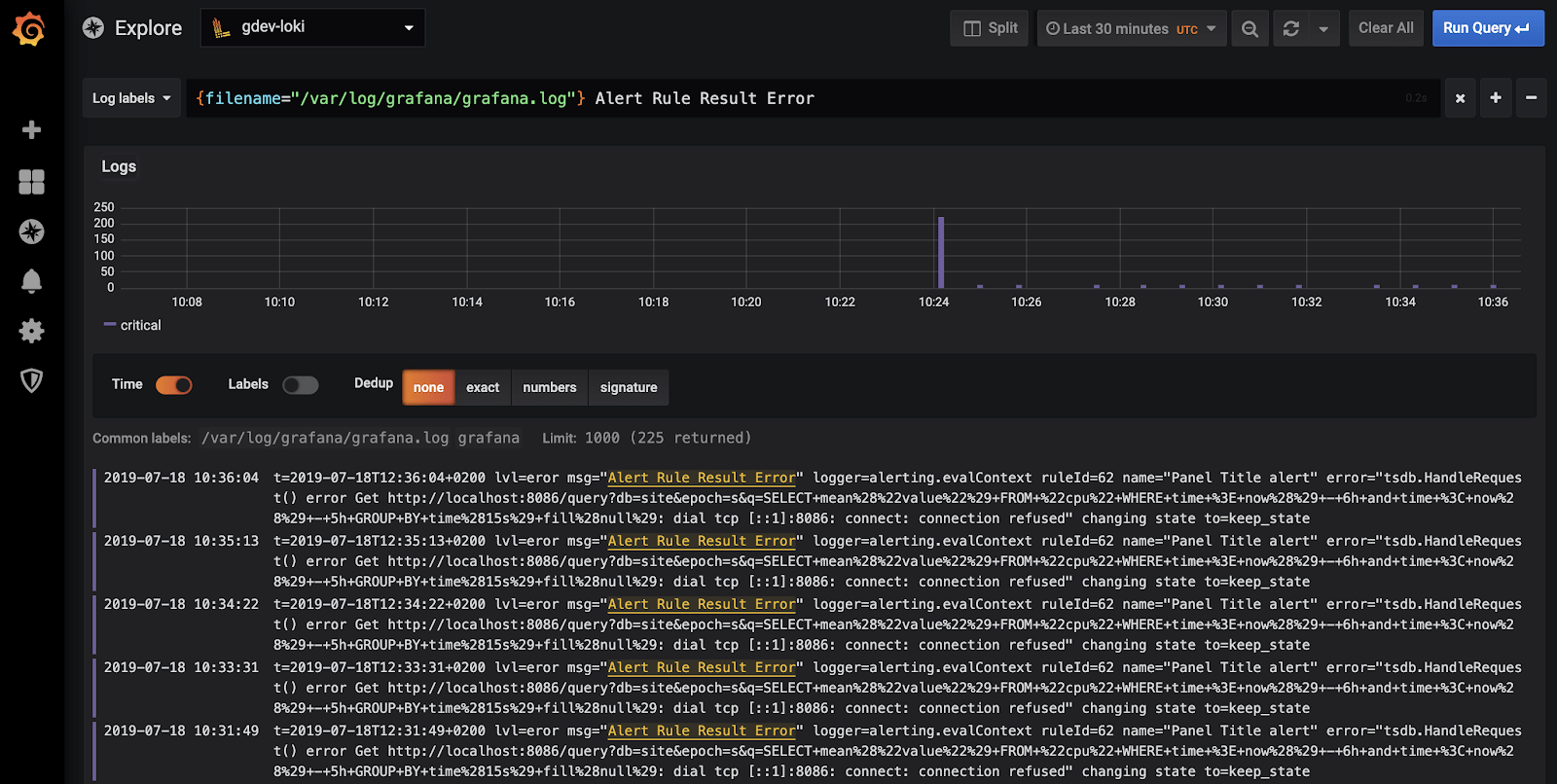
Grafana Loki
Loki indexes only metadata labels (not full log content), keeping costs low for high-volume ingestion. It accepts logs without requiring a specific format, genuinely useful for polyglot stacks. It supports live tailing and can generate metrics and alerts from log data.
The tradeoff: LogQL has a learning curve, and without full-text indexing, some complex log searches are slower than you’d like during a production incident.
Dynatrace
On the other hand, Dynatrace uses Grail for log management, which is designed to handle log data in a more schema-less way. Grail allows users to store massive amounts of log data (even in petabytes) without requiring traditional indexing. Once OneAgent is deployed, it seamlessly ingests logs into the Dynatrace platform.
Users have the flexibility to define custom ingestion rules and manage log retention according to specific business or compliance requirements. This makes Dynatrace's log management particularly useful for scenarios like debugging or auditing, where the ability to store and query logs over long periods is essential.
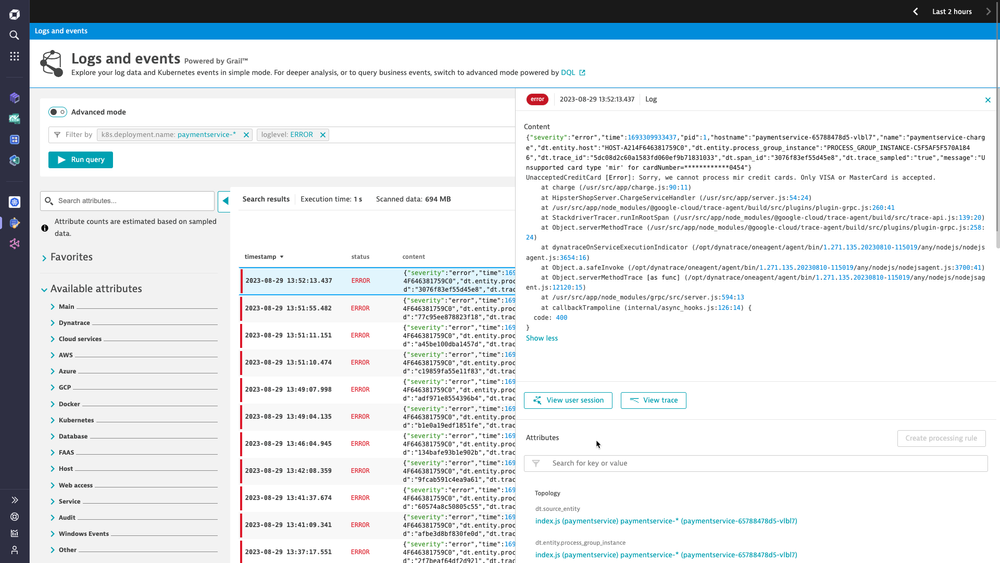
Loki is better for cost-conscious teams who want flexibility. Dynatrace Grail is better for teams that need deep APM-to-log correlation and don’t want to configure anything manually.
Infrastructure Monitoring
Grafana Cloud provides infrastructure monitoring for various environments like AWS, Kubernetes, and other integrations such as Linux machines, databases, and applications. With a managed Grafana instance, it offers integrations with diverse data sources, robust visualization tools, and alerting capabilities.
This made it easy for me to focus on monitoring my infrastructure without worrying about managing the backend. I was also able to build customized dashboards to track specific infrastructure metrics.
On the other hand, Dynatrace offers a single unified view of infrastructure metrics. As I navigated through the platform, I could easily access all the key performance indicators I needed, including outgoing connections, host performance, process analysis, disk usage, and more.
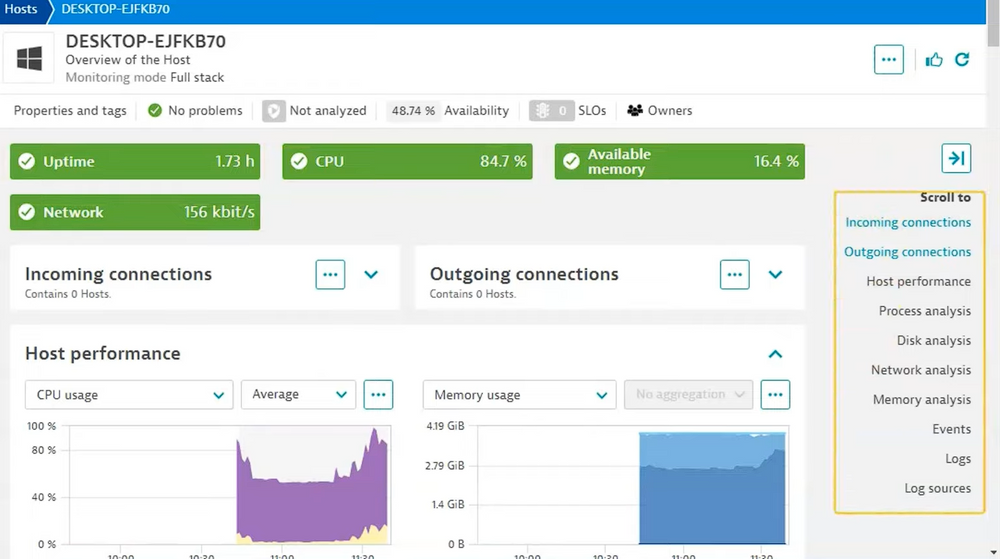
The Host performance analysis provides detailed information on CPU usage, memory usage, traffic, and disk throughput. Depending on needs, additional information such as swap usage, disk latency, and disk space usage can also be accessed.
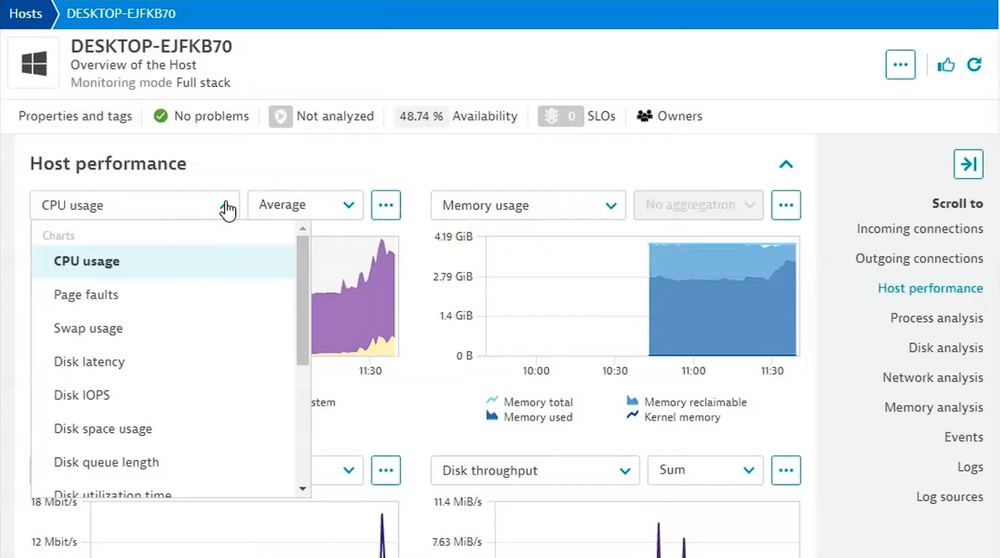
This in-depth details helped me better understand my system’s performance and made it easier to make decisions about resource optimization and management.
Dynatrace is the better choice for detailed infrastructure monitoring with automated insights and easy access to key metrics.
Visualization and Dashboards
Grafana is known for its excellent visualization capabilities. It offers a wide range of visualizations, including time series graphs, charts created with a pie chart maker, bar charts, heat maps, and more.
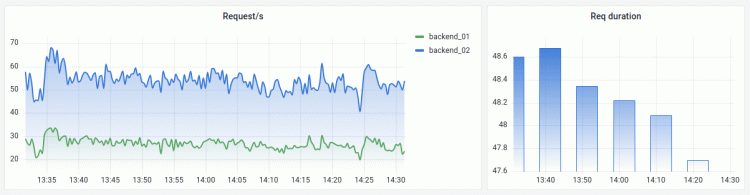
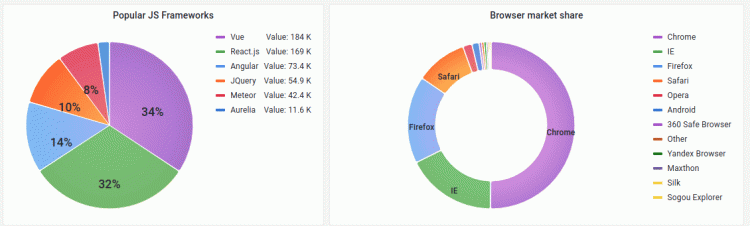
It is highly customizable, allowing users to adjust panels and metrics. Grafana also suggests visualization types based on your data, making it easier to choose the best representation. It is ideal for those who value flexibility and customization.
Dynatrace provides good visualizations for monitoring application and infrastructure performance. It focuses on clear, comprehensive views of real-time and historical data but offers less customization than Grafana.
When comparing Dynatrace vs Grafana in terms of visualization capabilities, Grafana is the preferred choice for users seeking versatile visualizations.
UI/UX - Grafana vs Dynatrace
I found Dynatrace’s user interface to be difficult to use, as it lacked clarity and wasn’t intuitive. Navigating the platform often required checking the documentation, which made the overall experience less enjoyable.
In contrast, Grafana provides a visually appealing and powerful UI, especially when compared to Prometheus. Its interface is user-friendly and designed for easy navigation and interaction.
Grafana offer great visualization capabilities. If you need more customization or want to visualize data from multiple sources, choose Grafana.
Pricing: What You’ll Actually Pay
Grafana, as an open-source platform, is free to use. It also offers a cloud version and an enterprise version to meet different user needs. The Grafana Cloud edition includes a free forever plan, while the enterprise version comes with a 14-day free trial.
Dynatrace follows a pricing model that varies based on the services used. It offers a 15-day free trial, allowing users to explore the platform’s features.
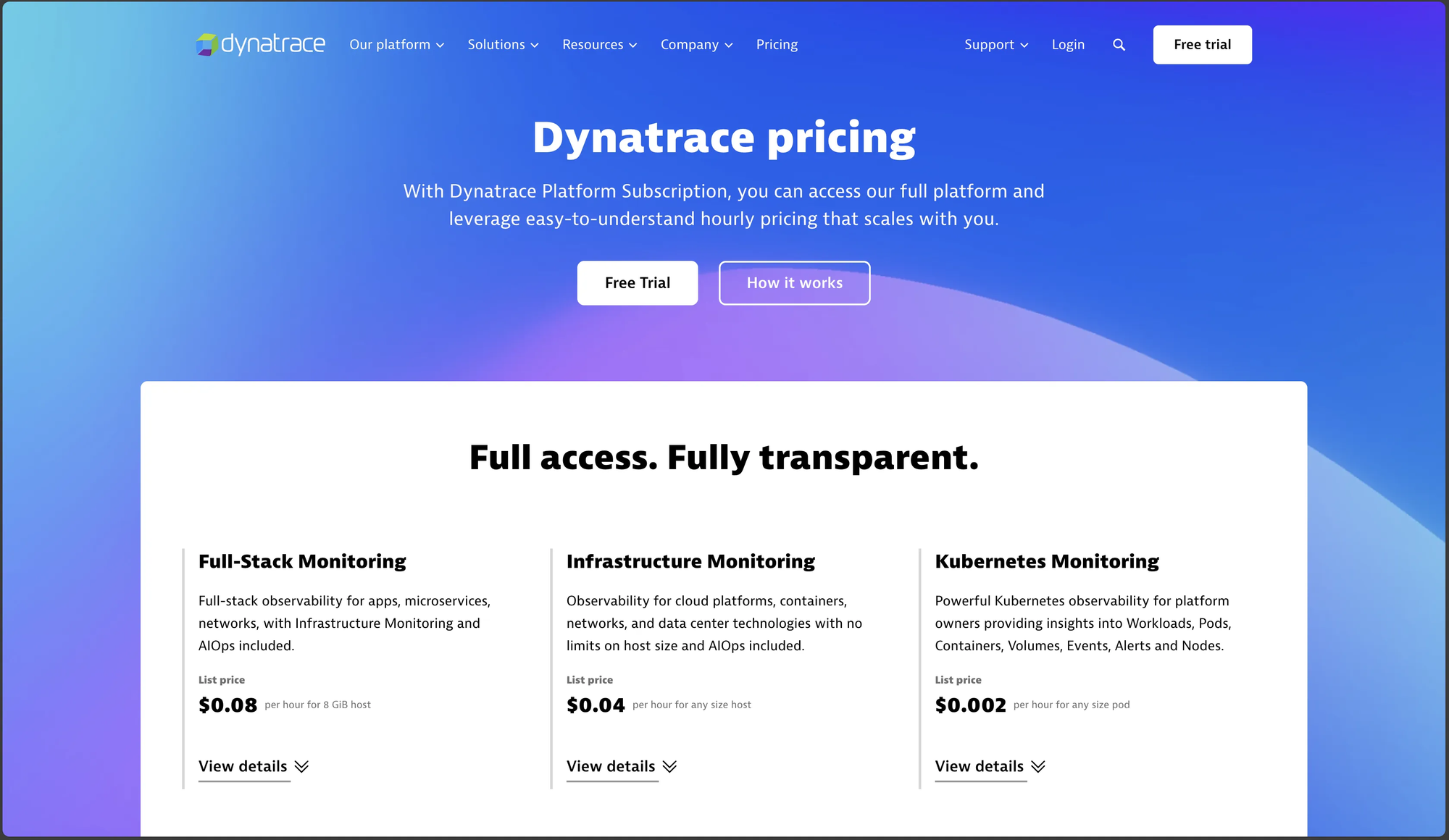
Both tools provide free and paid plans, but if you are looking for a fully free self-managed solution, the Grafana open-source version is the best choice.
Dynatrace vs Grafana: Final Verdict
If you are trying to decide between Grafana and Dynatrace, it depends on your specific use case and monitoring needs. Here’s a breakdown of when each tool is the better choice:
When to Choose Grafana:
- Custom Dashboards & Visualization : If you need highly customizable dashboards with a wide range of data sources, Grafana is ideal.
- Cost-Effective Monitoring : Grafana, especially with Loki for logs and Prometheus for metrics, provides a budget-friendly open-source solution.
- Flexible Infrastructure Monitoring : It integrates seamlessly with cloud platforms like AWS, Kubernetes, and databases, making it great for distributed environments.
When to Choose Dynatrace:
- AI-Driven Automation : Dynatrace provides automatic anomaly detection and root cause analysis, reducing manual troubleshooting efforts.
- Comprehensive Observability : With APM, log management, infrastructure monitoring, and security in a single platform, it offers an all-in-one solution.
- Minimal Manual Setup : Unlike Grafana, which requires manual integration with data sources, Dynatrace’s OneAgent automates data collection and monitoring.
Still not sure? Atatus offers a balanced alternative with APM, log management, and infrastructure monitoring in a single, cost-effective platform.
Neither Dynatrace nor Grafana the Right Fit?
If you've evaluated both tools and still feel stuck — you're not alone. Dynatrace is powerful, but its complexity and opaque enterprise pricing make it a hard sell for growing engineering teams. Grafana is flexible, but "flexible" often means hours of configuration, plugin management, and stitching together multiple data sources before you see your first dashboard.
Most DevOps teams and SaaS companies don't need a monitoring platform that requires a dedicated specialist to operate. They need full visibility — across applications, infrastructure, logs, and real users — without the overhead.
That's what Atatus is built for. It brings APM, infrastructure monitoring, real user monitoring, log management, and distributed tracing into a single platform, with a clean UI and transparent pricing. No lock-in. No configuration maze.
Whether you're scaling a SaaS product, managing microservices, or trying to reduce your observability toolchain, Atatus gives engineering leaders and DevOps teams the depth they need without the Dynatrace bill or the Grafana setup effort.
See Your Entire Stack in One Place
Atatus gives engineering and DevOps teams full-stack observability including APM, infrastructure, logs, RUM, and tracing without Dynatrace's complexity or Grafana's setup overhead. Get live in minutes.
Atatus - A better Alternative for Dynatrace and Grafana
Atatus is a full-stack application performance monitoring and observability tool that serves as an excellent Dynatrace and Grafana alternative.
Here are a few reasons why you can consider Atatus as an alternative to Dynatrace and Grafana:
- All in one platform: Atatus, as a full-stack monitoring solution, offers complete visibility into your logs, metrics, and traces from a single interface. It eliminates the need for additional tools or integrations, providing seamless monitoring for both your applications and infrastructure.
- Custom Dashboards: Atatus provides a user-friendly interface for creating custom dashboards to display metrics, alerts, and other data, making it easy for organizations.
- APM (Application Performance Monitoring): Identify and fix spikes in endpoint failures and monitor application performance in real-time. Gain in-depth insights into transaction details, slow database queries, poor-performing network calls, and more.
- Log Management: Atatus provides a flexible log management solution with an out-of-the-box UI. Correlate logs with APM traces and errors for a comprehensive view.
- Distributed Tracing: Gain end-to-end visibility into microservices, perform root cause analysis with trace data, map service dependencies, and correlate logs with traces for a detailed understanding of your system.
- Faster Time to Value: Most teams are live within minutes, not days. Atatus offers lightweight agents and agentless options across major languages and frameworks.
- Unified Observability Platform: Instead of stitching together Prometheus, Loki, Tempo, and Grafana dashboards, Atatus consolidates APM, RUM, infrastructure monitoring, logs, and distributed tracing in one place with a single agent, a single UI, and correlated data out of the box.
- Predictable Pricing: Atatus uses transparent, usage-based pricing with no surprise overages or opaque enterprise tiers. Engineering leaders can forecast costs accurately, making it easier to justify the platform at budget time without a sales negotiation every renewal cycle.
Still unsure about choosing between Grafana and Dynatrace?
Atatus gives you full-stack visibility without the complexity. Your team spends less time managing tools and more time fixing real issues.
FAQs About Dynatrace and Grafana
What is the main difference between Dynatrace and Grafana?
Dynatrace is an all-in-one observability platform with automatic monitoring and AI-powered root cause analysis. Grafana is a visualization tool, it doesn't collect data on its own. You need to pair it with Prometheus, Loki, and Tempo to build a full monitoring stack. Dynatrace is easier to start with; Grafana gives you more control.
Is Grafana free to use?
Yes. The open-source version of Grafana is completely free to self-host. Grafana Cloud also has a free tier (50GB logs, 10k metric series, 50GB traces). Beyond that, you pay based on usage. Keep in mind that self-hosting has hidden costs, someone on your team has to set it up and keep it running.
Is Dynatrace worth the cost for small teams?
Honestly, probably not. Dynatrace is built for enterprise environments with large infrastructure and compliance needs. If you're a startup or a small SaaS team, you'll likely pay for capabilities you don't use. A lighter alternative like Atatus gives you APM, logs, and infrastructure monitoring at a fraction of the price.
Can Grafana replace Dynatrace?
It depends on what you need. Grafana can cover APM, logs, and infrastructure monitoring when combined with the right tools but you're assembling and maintaining that stack yourself. Dynatrace does all of it automatically, with AI. If your team has the bandwidth, Grafana can replace Dynatrace. If not, you'll feel the gap fast.
Which tool is easier to set up - Dynatrace or Grafana?
Dynatrace. You install OneAgent and it starts collecting data automatically within minutes. Grafana requires manual configuration of multiple tools, data sources, dashboards, and alert rules. For teams without a dedicated platform engineer, Grafana's setup can take days or weeks to get right.
Does Grafana have AI-powered monitoring like Dynatrace?
No. Dynatrace has Davis AI built in, it detects anomalies and tells you the root cause automatically. Grafana has no equivalent out of the box. When something breaks, you're doing the investigation yourself by digging through dashboards and logs manually.
What is a good alternative to both Dynatrace and Grafana?
If you want the automation of Dynatrace without the enterprise price tag, and the simplicity of a managed tool without Grafana's setup complexity, Atatus is worth trying. It covers APM, log management, infrastructure monitoring, real user monitoring, and distributed tracing in one platform with a 14-day free trial and no credit card required.
#1 Solution for Logs, Traces & Metrics
 APM
APM
Kubernetes
Logs
Synthetics
RUM
Serverless
Security
More

![Splunk vs Prometheus: A Side-by-Side Comparison [2025 Guide]](/blog/content/images/size/w960/2024/08/Datadog-vs-sentry--13-.png)