Monitor every layer of your network
Hop-by-hop paths, NetFlow traffic, SNMP device health, traps and IPsec tunnels, collected by one Atatus Infrastructure Agent and shown next to your application data.
One map. Five layers on it.
Switch a layer on to see what Atatus adds to the same network.
acc-sw-02 has one interface down. edge-rtr-01 runs at 64 % CPU.
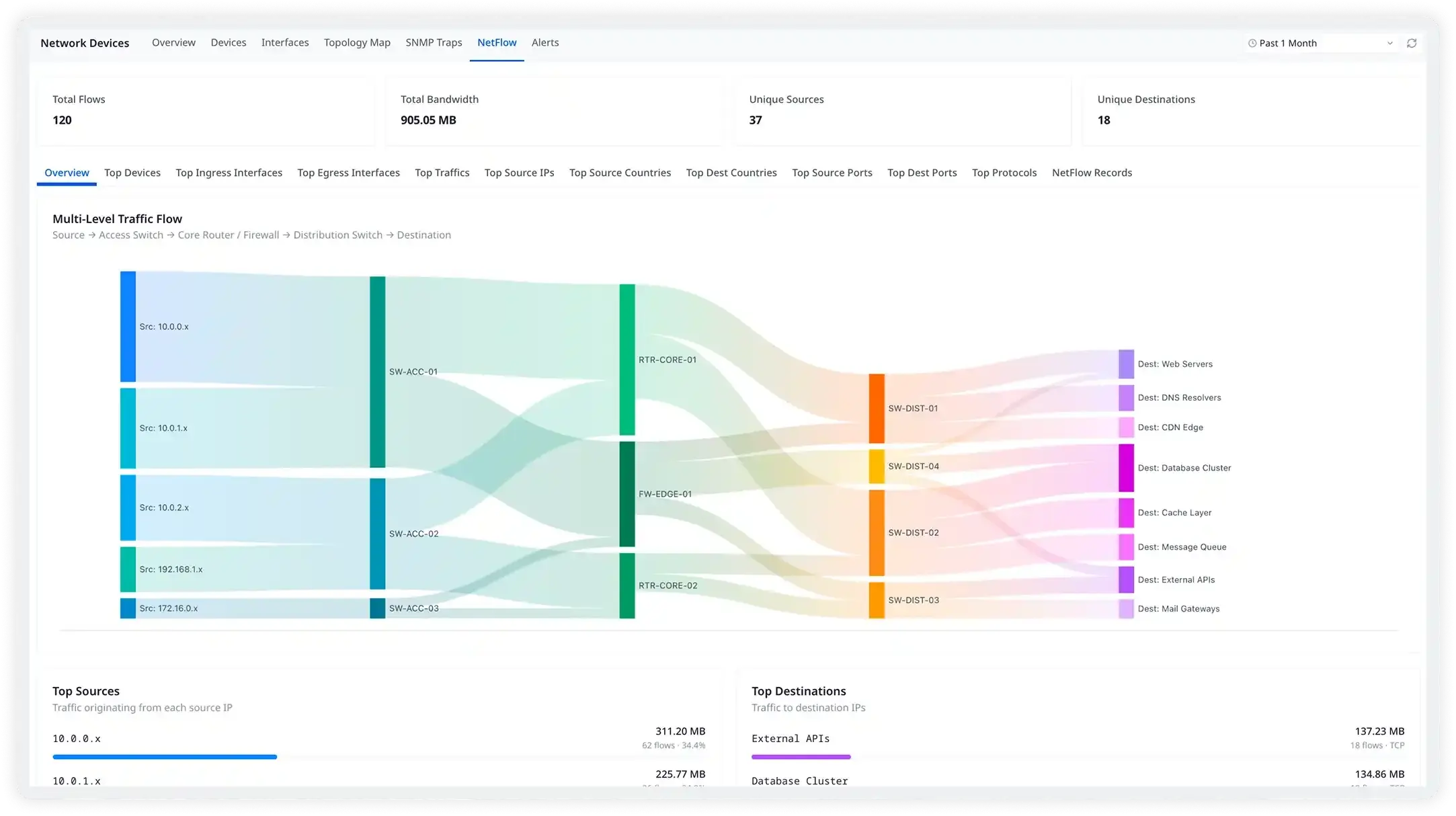
Network device monitoring ↗web-1 sent the most traffic: 311 MB in the last hour, from NetFlow on the switches.
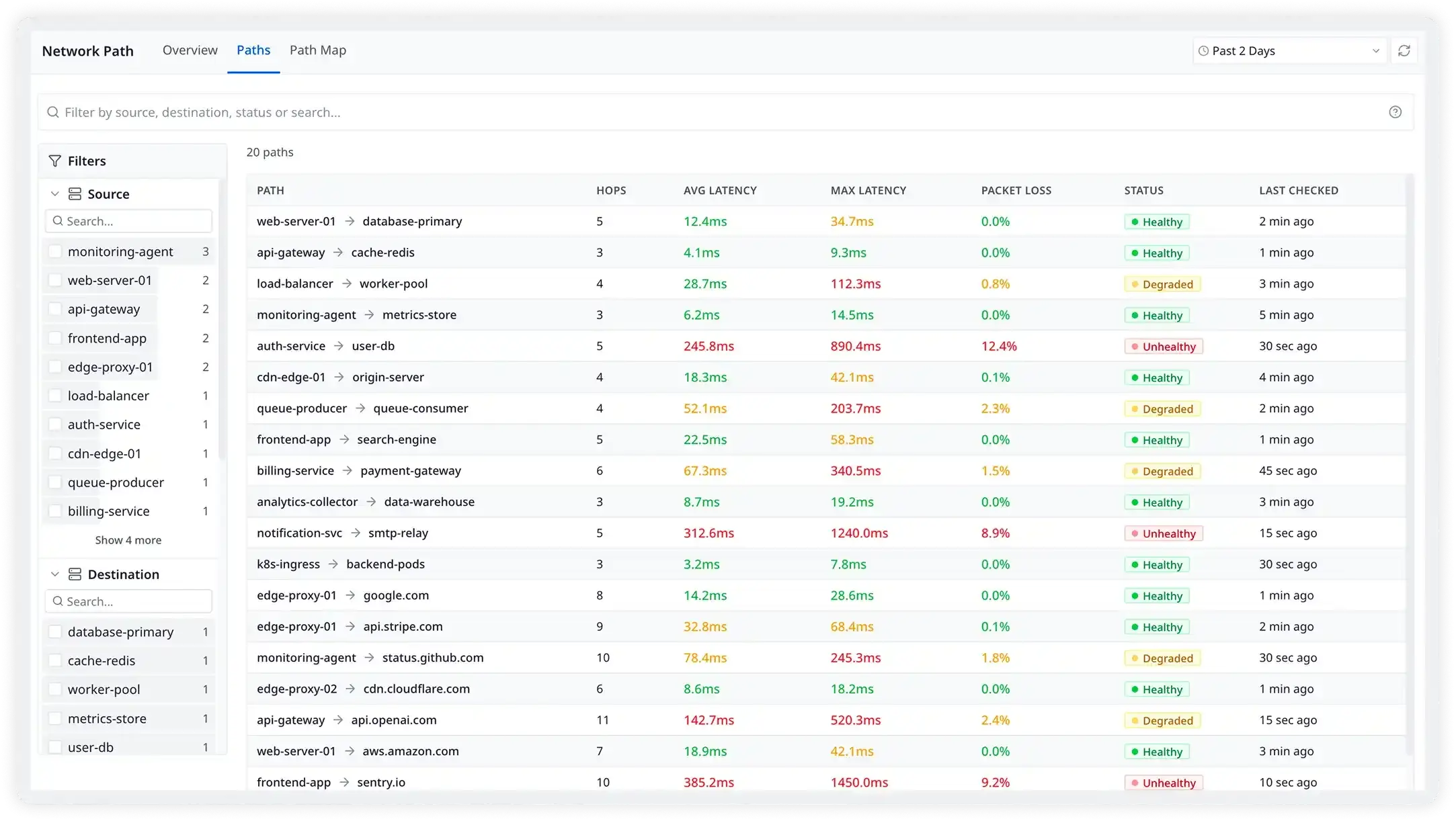
NetFlow in device monitoring ↗api.stripe.com is 45 ms away. The transit hop adds 39 ms of it.
Network path monitoring ↗Two SNMP traps in the last 10 minutes: linkDown and authenticationFailure.
SNMP traps ↗Tunnel1 to Site A is up. Tunnel2 to Site B is down. Cisco IPsec tunnels.
VPN monitoring ↗
Follow the bytes.
Flows from your switches and routers, from source subnet to destination. Pick a subnet to isolate it.
namespace: chennai-office- 873 rsync211 MB
- 5432 postgres168 MB
- 443 https144 MB
- 22 ssh42 MB
Sample data
Switch it on. Know what to open.
Pick the network jobs for the Atatus Infrastructure Agent. See the ports each one needs and the file it lives in.
- Outboundagentswitches, routers, firewallsUDP 161SNMP polling
- Inbounddevices sending trapsagentUDP 162Trap receiver
- OutboundagentAtatusHTTPS 443Always
Open 1 inbound UDP port on the agent host. Outbound, the agent only needs HTTPS 443 to Atatus plus the polls and probes above.
Network Monitoring, screen by screen.
Real screens from the Atatus app.
Questions about network monitoring
Pricing, deployment, data and the agent. If something is missing, a person will answer it on a demo call.
Network monitoring tracks the performance, health and availability of your network devices, interfaces and traffic, so you can catch outages, slowdowns, bottlenecks and security issues before users report them. In Atatus it covers SNMP device metrics, SNMP traps, NetFlow, ping, VPN tunnels and network paths.
Atatus puts network data in the same place as your application data: hop-by-hop latency and loss on the paths your services use, device CPU, memory and interface errors, SNMP traps and traffic flows. You can check the network, or rule it out, without switching tools.
No. Devices are polled over SNMP on UDP 161. You run the Atatus Infrastructure Agent 4.2.0 or later on a host that can reach them and list the devices in snmp.yml, or give it a subnet and let autodiscovery find them. Nothing is installed on the devices themselves.
SNMP v1, v2c and v3. Use community strings for v1 and v2c. For v3, set a user with an auth protocol such as SHA256 and a privacy protocol such as AES256.
Yes. Run the agent wherever your traffic starts, in a cloud VPC or a data center, and point path tests at the endpoints you depend on. Namespaces keep devices that share the same private IP apart across sites, and every agent reports into the same Atatus account.
An SNMP trap is a message a device sends on its own when something happens, such as an interface going down (linkDown) or a reboot (coldStart). Polling only sees the change on the next poll. The Atatus Infrastructure Agent has a built-in trap receiver on UDP 162 that accepts SNMPv2 community strings and SNMPv3 users.
Install or update the Atatus Infrastructure Agent to 4.2.0 or later, then add the files you need under /etc/atatus-infra-agent/conf.d/: snmp.yml for devices and traps, netflow.yml for flows and networkpath.yml for path tests. Restart the agent and data starts arriving.
Yes. The agent listens on UDP for netflow5, netflow9, ipfix and sflow5 records, enriches flows with reverse DNS and aggregates them before sending. You can run several listeners on different ports and tag them with a namespace, then see top sources, destinations, ports and protocols.
Path tests trace the route hop by hop from wherever the agent runs, so you see latency and loss on each hop as traffic crosses cloud, ISP and data center boundaries, and when the route changes. VPN monitoring adds tunnel state, traffic and failures for Cisco IPsec tunnels.
Paths, flows, devices and tunnels from one agent, next to your application data.
- SaaS
- On-premises
- Hybrid
- BYOC
- No per-user pricing
Compare Atatus with SolarWinds · Nagios