See exactly where your traffic slows down
The Atatus Infrastructure Agent runs traceroute tests to the endpoints your services depend on and records latency, loss and reverse DNS for every hop. When a path slows down, you see which hop added the time.
Find the hop that hurts.
Three probes per hop, every cycle. Click a hop to see what it adds.
Hop 4 adds most of the 45 ms to api.stripe.com, and drops 2.4 % of probes.
Sample data · new probe every 3 seconds while you watch
Type an endpoint. Get a test.
Enter a host and port and pick a protocol. The networkpath block writes itself, and the first trace comes back.
metrics: - enabled: true networkpath: dest_hostname: "api.stripe.com" dest_port: 443 destination_service: "payments" source_service: "atatus-infra-agent" protocol: "tcp" tcp_method: "syn" max_ttl: 30 timeout: 2s traceroute_queries: 3 e2e_queries: 1 reverse_dns: true tcp_syn_paris_traceroute_mode: true
sudo systemctl restart atatus-infra-agent- 1gateway.vpc.internal10.0.0.10.6 ms
- 2nat-gw.vpc.internal100.64.0.11.2 ms
- 352.93.12.402.8 ms
- 4ae-3.isp-transit.net99.82.180.1741.6 ms
- 5peer-1.cdn-edge.net104.18.2.944.1 ms
- 6api.stripe.com13.248.169.4845.0 ms
Sample data
Know when the route moves.
Routing changes from your ISP or BGP are marked on the latency strip. Click one to compare the path before and after.
- agent
- 10.0.0.1
- 52.93.12.44
- ae-1.isp-a.net
- api.stripe.com
- agent
- 10.0.0.1
- 52.93.12.40
- ae-3.isp-transit.net
- peer-1.cdn-edge.net
- api.stripe.com
Traffic moved from ISP A to a transit provider and gained a hop. This is the path the hop ladder above shows now. Sample data
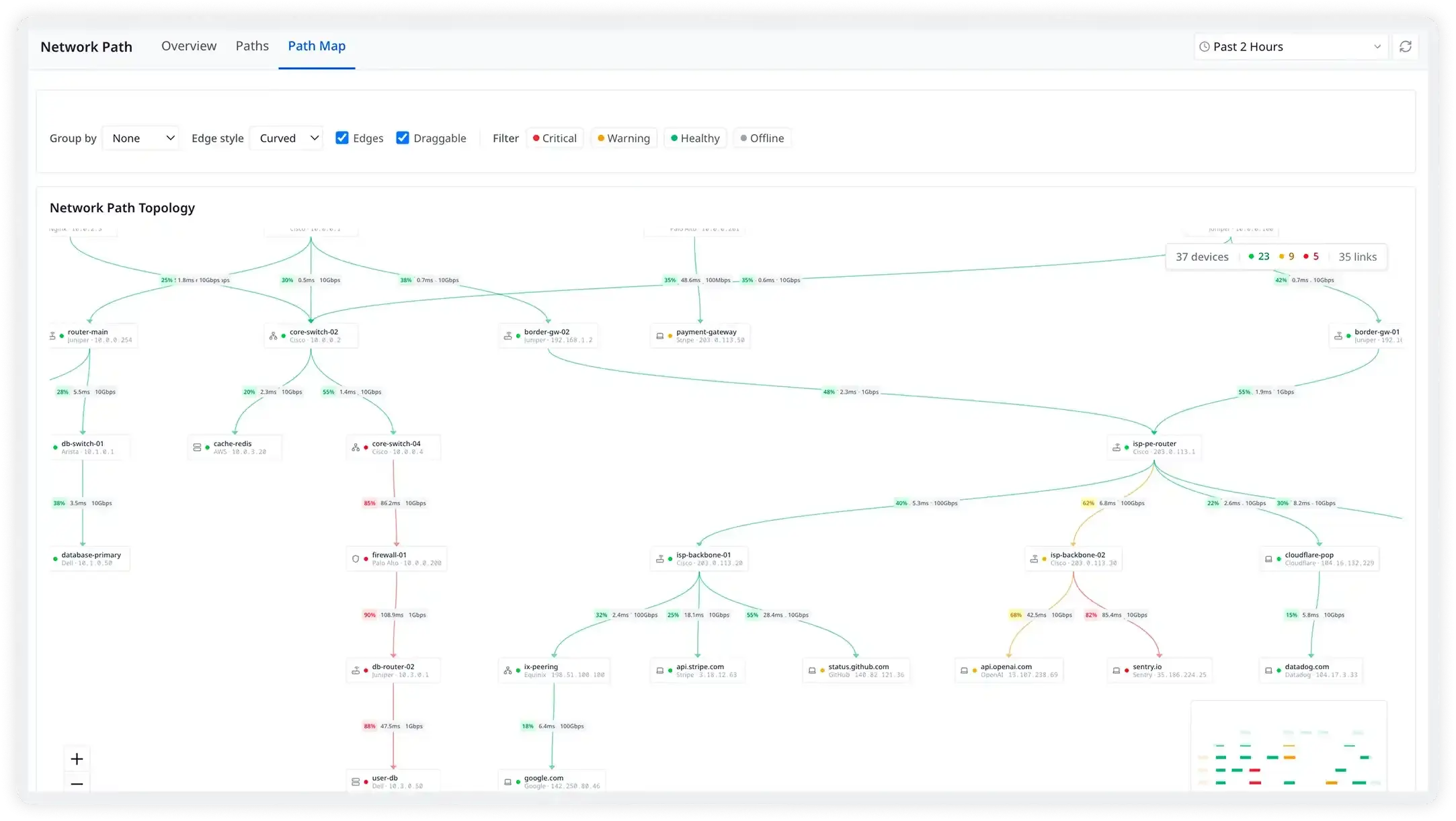
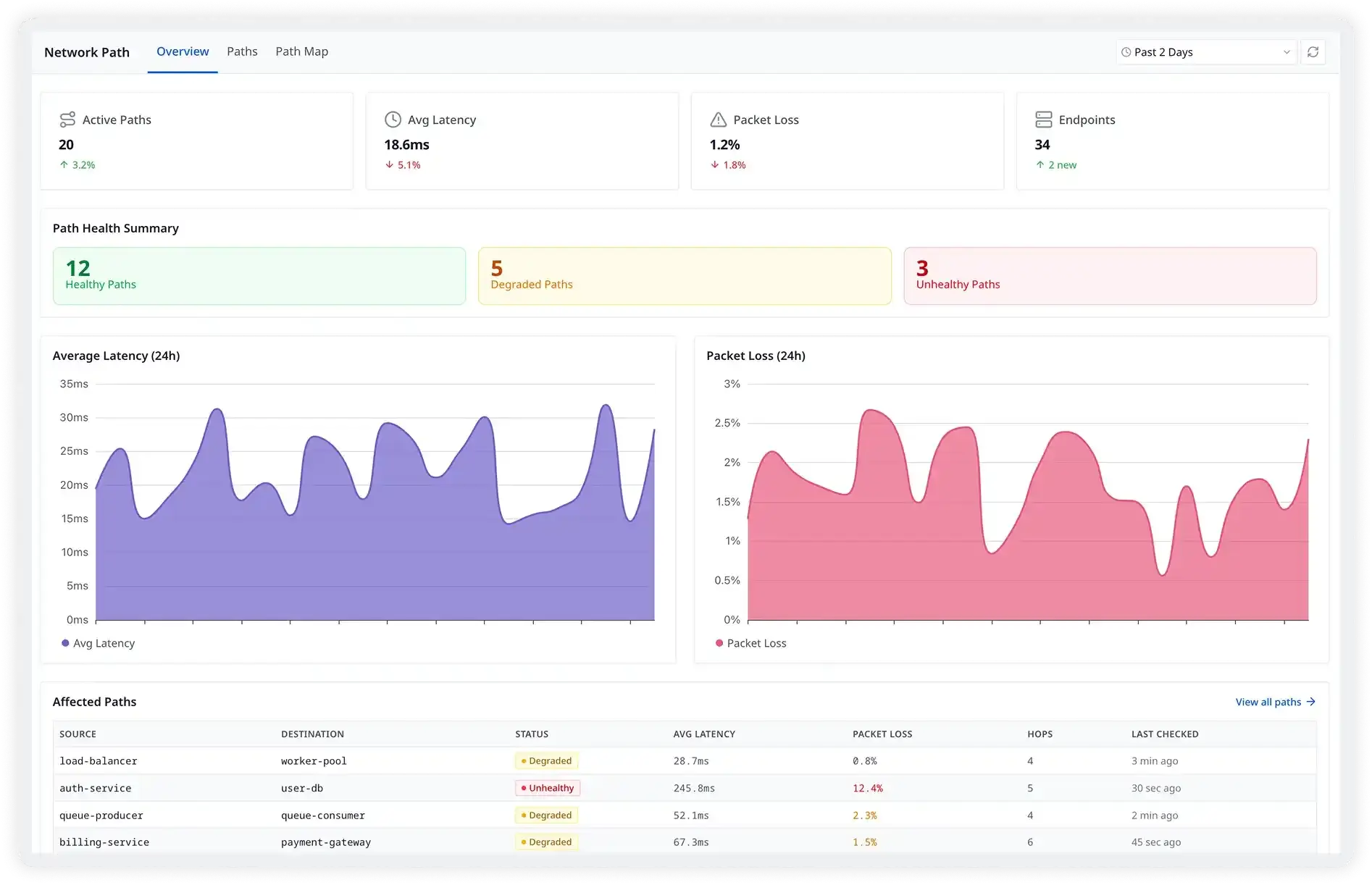
Network Path, screen by screen.
Real screens from the Atatus app.
Questions about network path monitoring
Pricing, deployment, data and the agent. If something is missing, a person will answer it on a demo call.
It runs traceroute-based tests from the Atatus Infrastructure Agent to the endpoints you choose, over TCP, UDP or ICMP. Each test records latency and reachability for every hop, reverse DNS names for the hops and end-to-end latency, so you can see which hop is slow or dropping packets.
End-to-end monitoring tells you that a path is slow. Hop-level data shows which router or network segment added the time, so you know where to look and who to call.
No. The Atatus Infrastructure Agent 4.2.0 or later runs the tests from a Linux or Windows host. Nothing changes on routers, switches or the services you test.
Tests run periodically. Each run sends traceroute_queries traceroutes (3 in the example config) and e2e_queries end-to-end probes, waits up to the per-hop timeout (for example 2s) and follows the route for up to max_ttl hops.
Yes. Because tests run continuously, Atatus detects BGP or ISP routing changes over time, so you can see when traffic started taking a different set of hops and how latency changed with it.
TCP is the most accurate for real traffic paths and supports syn, sack, prefer_sack and syn_socket methods, with Paris traceroute mode to avoid load-balancing artifacts. UDP and ICMP are also supported.
From any Linux or Windows host running the agent, including containers: set source_container_id when the agent runs inside Docker or Kubernetes, and source_service when several agents test the same endpoint. Targets can be any hostname or IP and port.
Probe every hop between your services and the endpoints they depend on, and see when routes change.
- SaaS
- On-premises
- Hybrid
- BYOC
- No per-user pricing
Compare Atatus with PRTG · SolarWinds